What I did
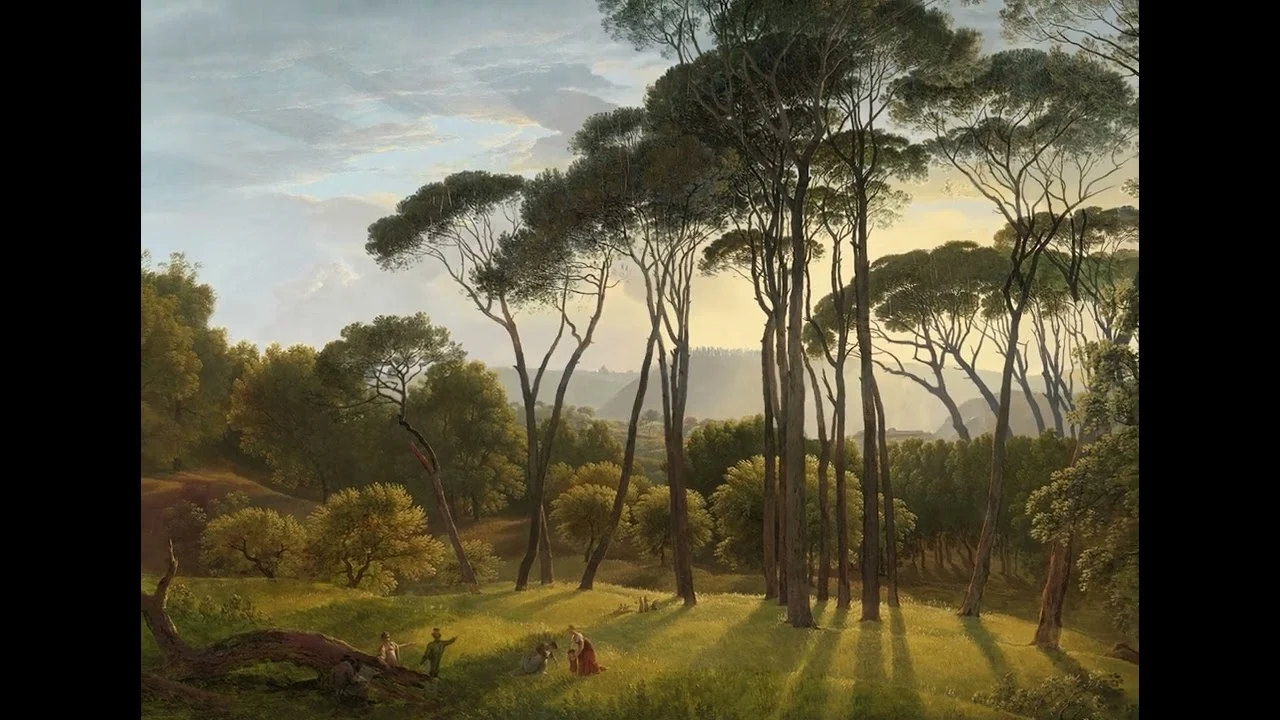
I made a diorama of a Hendrik Voogd painting which makes it appear to be a three-dimensional scene as you scroll down the page. I also made an animated version of the scene in After Effects.


About the original painting: Italian Landscape with Umbrella Pines
Hendrik Voogd, 1807
From the Rijksmuseum website: Voogd was known as the ‘Dutch Claude’, after the French painter Claude Lorrain, who was famous for his history landscapes bathed in golden light. Voogd painted the gardens of the Villa Borghese in Rome in the late afternoon. The sun casts long shadows, and the trees stand out sharply against the sky. Strolling figures are enjoying the magnificent sunset. In the foreground, an artist is seated against a tree and drawing.
Find out more about the original painting at: https://www.rijksmuseum.nl/
I’m a bit obsessed with old photographs and paintings, and wanting to make them come to life digitally, while being respectful of the original artist.
I’ve been doing a lot of reading, tinkering and learning surrounding 2.5D photography recently, and I’ve been experimenting with dioramas and parallax images, both in Adobe After Effects and embedded in web pages directly. The image at the top of this page is an example – as you scroll down, you get a subtle parallax effect.
What is 2.5D Photography?
It’s basically the art of turning a conventional 2D photo or image and making it appear to be 3-dimensional. It’s part optical illusion and part digital trickery.
I found this painting on the (brilliant) Rijksmuseum website and thought it was amazing – I love the golden light and the fact that there are so many little vignettes within the work.
The first task when you’re making a parallax 2.5D image is to separate the different layers within the image – eg, foreground, mid-ground, background (plus others in-between depending on the image). I shot myself in the foot a bit with this image as it’s extraordinarily tricky to isolate each layer – all those trees, hedges and leaves!! It’s lucky that I like a challenge…
Because the different layers of the image need to move independently of one another in order to make the parallax effect, you have to fill in details which are concealed in the original painting (eg, the areas behind the tree trunks). Photoshop Generative AI came in handy here, plus a lot of clone stamping and fiddling about.
The video version
Once the layers were in good shape, I imported them into Adobe After Effects and arranged them in a 3D space, then set a camera to ‘dolly’ slowly through the scene. It’s a pretty fiddly process and is really tricky to get the alignment true to the original painting. I used the puppet warp tool to put some very subtle movement into the figures within the scene…hopefully not so subtle you don’t notice it! It’s far from perfect and there are certain things that jar a little – I would have liked to animate the long afternoon shadows being cast by the tree trunks in the foreground, for example, but I had to wrap it up and move onto other projects! Maybe I’ll revisit and improve it at a later date, and maybe choose a simpler image next time!
What I learnt
I was extraordinarily ambitious choosing this particular painting as it has SO many details that need to be cut out. Also the figures in the foreground of the scene are tiny, which means they are fiddly to animate (and ultimately, I don’t think their movement is very noticeable in the final animation anyway!). I realised mid-way that I should probably have animated the shadows that the trees cast, but I ran out of patience and skill at that point.
It was a great learning exercise and it made me notice lots of details about the painting that I wouldn’t have found if I’d just glanced at it in a gallery.
Have a project in mind?
A website, a photo shoot, or something in between. Tell me what you’re thinking and I’ll get back to you.